
Kia Telluride: Driving your vehicle / TOW mode
When towing a trailer with the Kia Telluride, select TOW mode to adjust the transmission shift pattern for heavier loads and support smoother, more controlled driving.
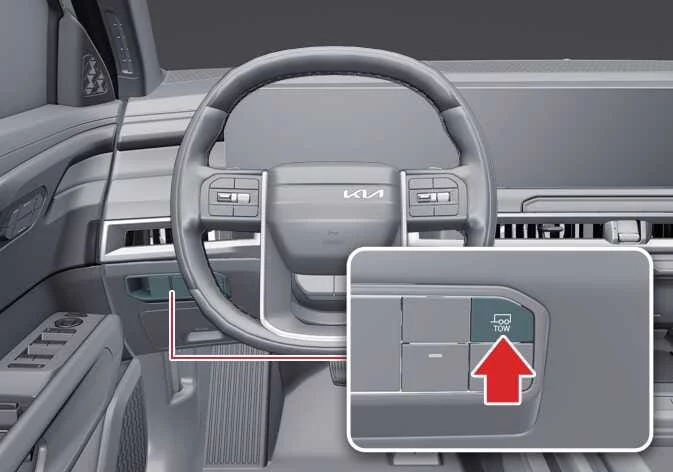
|
Press the TOW mode button on the instrument panel to activate the towing function.
When TOW mode is active, the Kia Telluride adjusts power output, transmission operation, braking behavior, and ESC response to better support trailer towing. The TOW mode indicator appears on the instrument cluster.
When the vehicle is in P (Park), you can set the trailer weight through the Trailer menu on the infotainment system screen.
TIP
While driving in TOW mode, switching between DRIVE MODE and TERRAIN MODE is not available.
 Active Air Flap (AAF): (if equipped)
The Active Air Flap (AAF) system in the Kia Telluride controls the air flap located below the front bumper to help manage airflow for component cooling and improved fuel efficiency...
 Economical operation
The fuel economy of your Kia Telluride depends largely on how, where, and when you drive. Driving habits, road conditions, traffic, vehicle load, and maintenance condition all affect fuel consumption...
Other information:
Kia Telluride (LQ2, 2027-2026) Owner's Manual: Navigation-based Smart Cruise Control settings. Auto Highway Speed Change
Auto Highway Speed Change Driver Assistance Driving Convenience Auto Highway Speed Change While the vehicle is ON, open Setup > Vehicle > Driver Assistance > Driving Convenience > Auto Highway Speed Change on the infotainment display to configure this feature.
Kia Telluride (LQ2, 2027-2026) Owner's Manual: Jack label
Figure 1. Type A Figure 2. Type B Figure 3. Type C The exact sticker placement and visual format of the jack label supplied with your vehicle may vary slightly from the diagrams shown above.