
Kia Telluride: Driving your vehicle / Active Air Flap (AAF): (if equipped)
The Active Air Flap (AAF) system in the Kia Telluride controls the air flap located below the front bumper to help manage airflow for component cooling and improved fuel efficiency.
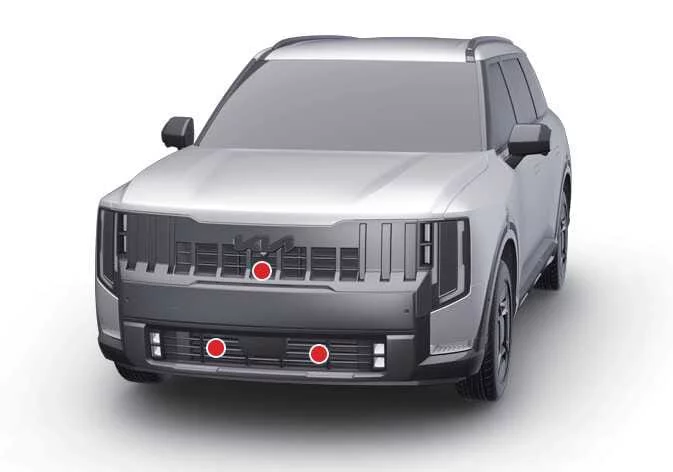
|
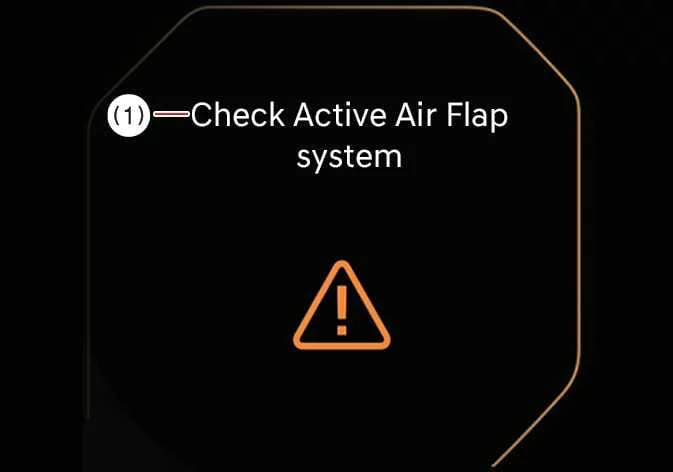
Active Air Flap malfunction
|
|
The Active Air Flap system may not operate normally if the flap is temporarily held open by foreign material, or if the controller area is affected by snow, rain, ice, dirt, or other external conditions.
If the warning message appears on the display, stop the Kia Telluride in a safe location and inspect the air flap area. Remove any visible foreign material or obstruction as needed.
After correcting the issue, wait approximately 10 minutes and then restart the vehicle. If the message continues to appear, have the vehicle inspected by an authorized Kia dealer.
NOTE
-
Even if no warning message is displayed, visually check the air flaps if they appear uneven or asymmetrical on vehicles with exposed flaps. Turn the vehicle off, wait about 10 minutes, and restart it to confirm normal operation.
-
The Active Air Flap system is operated by electric motors. Do not force, block, or manually interfere with flap movement, as excessive pressure may damage the mechanism.
NOTE
The Active Air Flap system may operate regardless of the vehicle condition, including parking, driving, charging, or other operating states.
 Drive mode integrated control system. DRIVE MODE
The drive mode integrated control system in the Kia Telluride allows the driver to choose a driving mode that best matches current road conditions, the surrounding environment, or personal driving preference...
 TOW mode
When towing a trailer with the Kia Telluride, select TOW mode to adjust the transmission shift pattern for heavier loads and support smoother, more controlled driving...
Other information:
Kia Telluride (LQ2, 2027-2026) Owner's Manual: Surround View Monitor malfunction and limitations
Surround View Monitor malfunction If Surround View Monitor malfunctions, the image on the display may appear green, blue, black, distorted, or otherwise abnormal. Have the Kia Telluride inspected by an authorized Kia dealer if Surround View Monitor does not operate correctly, if the screen flickers, or if the camera image is not displayed properly.
Kia Telluride (LQ2, 2027-2026) Owner's Manual: Setting the power liftgate
The Kia Telluride allows you to customize several power liftgate functions for greater convenience. You can select your preferred opening speed and maximum opening height through the infotainment system. If you do not wish to use these features, they can be disabled in the settings menu.