
Kia Telluride: Driving your vehicle / Paddle shifter
The paddle shifter function allows you to manually select gears while the Kia Telluride remains in D (Drive), providing greater control during acceleration, overtaking, or when driving on winding roads and steep grades.
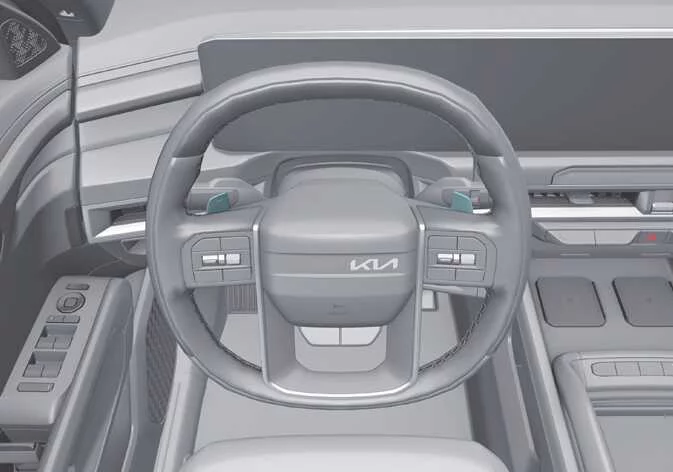
|
With the gear in D (Drive)
The paddle shifter system becomes available when the vehicle speed exceeds 6 mph (10 km/h).
Pull the (+) paddle to upshift or the (-) paddle to downshift one gear at a time. As soon as either paddle is operated, the transmission temporarily changes from automatic operation to manual shift mode.
To return from manual shift mode to normal automatic operation, use one of the following methods:
-
Pull and hold the (+) paddle shifter for more than one second.
-
Select D (Drive).
The Kia Telluride also automatically returns from manual shift mode to automatic mode under either of the following conditions:
-
The accelerator pedal is applied gently for more than 6 seconds while driving.
-
The vehicle comes to a complete stop.
TIP
If both paddle shifters are pulled at the same time, no gear change will occur.
 Good driving practices
Never shift from P (Park) or N (Neutral) into another gear while pressing the accelerator pedal. Never move the transmission into P (Park) while the Kia Telluride is still in motion...
 All Wheel Drive (AWD): (if equipped)
The available All Wheel Drive (AWD) system in the Kia Telluride automatically distributes engine power between the front and rear wheels to improve traction and overall vehicle stability...
Other information:
Kia Telluride (LQ2, 2027-2026) Owner's Manual: Side air bag and front center side air bag
Your Kia Telluride is equipped with side air bags for both front occupants as well as the outboard passengers in the second row. In addition, a front center side air bag is designed to provide enhanced protection between the driver and front passenger during certain side-impact collisions.
Kia Telluride (LQ2, 2027-2026) Owner's Manual: Intelligent Speed Limit Assist settings. Speed Limit
Speed Limit Driver Assistance Speed limit Speed limit assist Speed limit warning Off While the vehicle is ON, open Setup > Vehicle > Driver Assistance > Speed Limit on the infotainment screen to configure the available Intelligent Speed Limit Assist settings.