
Kia Telluride: Lighting / High Beam Assist (HBA)
|
The High Beam Assist (HBA) system on the Kia Telluride is designed to improve nighttime visibility by automatically switching between high and low beam headlights. Using information gathered from the vehicle's sensors, the system evaluates surrounding traffic and ambient lighting conditions to provide maximum illumination without unnecessarily dazzling other road users.
Detection sensor
Refer to the Detecting sensor(s) section for detailed information about the sensors used by the High Beam Assist system and their installation locations.
TIP
-
Keep the front view camera clean and unobstructed to ensure the Kia Telluride High Beam Assist system performs as intended.
-
Additional information regarding the front view camera can be found in the Forward Collision-avoidance Assist (FCA) (Sensor Fusion) section.
High Beam Assist (HBA) setting
|
|
With the vehicle in the ON position, open Setup > Vehicle > Lights > High Beam Assist in the infotainment Settings menu to enable or disable the High Beam Assist function.
WARNING
For your safety, adjust High Beam Assist settings only after parking the Kia Telluride in a secure location.
High Beam Assist (HBA) operation
-
Once High Beam Assist has been enabled through the Settings menu, the system operates as follows:
-
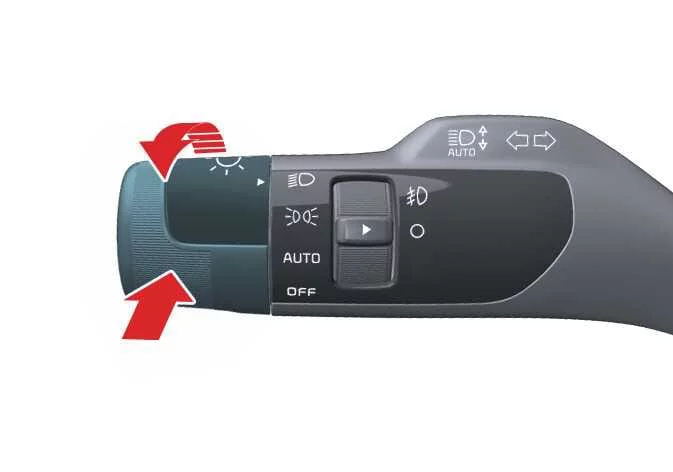
Set the lighting switch to AUTO and push the headlamp lever toward the instrument cluster. The HBA (
) indicator will illuminate on the instrument cluster to confirm that the feature is active. -
When active, High Beam Assist automatically switches the high beams on once vehicle speed exceeds approximately 20 mph (30 km/h). At speeds below approximately 12 mph (20 km/h), the system will not activate the high beams.
-
Whenever the high beams are operating, the high beam indicator (
 ) will illuminate on the Kia Telluride instrument cluster.
-
-
If you manually operate the lighting controls while High Beam Assist is active, the system responds as follows:
-
Pulling the headlamp lever toward you while the high beams are off will briefly activate the high beams without canceling High Beam Assist. Once the lever is released, it returns to its center position and the high beams switch off.
-
Pushing the headlamp lever toward the instrument cluster manually turns on the high beams and cancels High Beam Assist.
-
If the lighting switch is moved from the AUTO position to another lighting mode, the High Beam Assist function is automatically deactivated and the selected lighting mode takes priority.
-
-
While High Beam Assist is operating, the system automatically switches from high beam to low beam in the following situations:
-
An approaching vehicle's headlights are detected.
-
The taillights of a vehicle traveling ahead are detected.
-
The headlight or taillight of a motorcycle or bicycle is recognized.
-
Ambient lighting becomes bright enough that high beams are no longer necessary.
-
Street lamps or other strong light sources are detected nearby.
-
High Beam Assist malfunction and limitations
High Beam Assist (HBA) malfunction
|
|
|
If the High Beam Assist system is not functioning correctly, the Master Warning indicator () will illuminate on the instrument cluster together with a Driver Assistance warning message for several seconds. If this occurs, have your Kia Telluride inspected by an authorized Kia dealer.
High Beam Assist (HBA) limitations
The High Beam Assist feature may not operate as expected under the following conditions:
-
The system cannot properly detect lighting from another vehicle.
-
The headlamps are covered by dirt, snow, ice, or water.
-
The headlights are off while the fog lamps are on.
-
A light source resembling a vehicle headlamp is detected.
-
The headlamp assemblies are damaged or have been improperly repaired.
-
The headlights are incorrectly aimed.
-
You are driving on narrow, winding, rough, or steep roads.
-
You are approaching an intersection or curve where only part of another vehicle is visible.
-
Traffic signals, mirrors, reflective signs, or flashing lights are present ahead.
-
Temporary reflective objects or construction warning lights are detected.
-
Road surfaces are wet, icy, snow-covered, or otherwise slippery.
-
A vehicle suddenly enters your field of view from around a bend.
-
A vehicle is leaning because of a flat tire or is being towed.
-
Smoke, fog, heavy rain, snow, exhaust fumes, or similar obstructions prevent the system from detecting another vehicle's lights.
TIP
-
High Beam Assist is designed to support the driver but cannot replace attentive driving. Always monitor traffic conditions and manually operate the headlights whenever necessary.
-
The Kia Telluride High Beam Assist function may require approximately 15 seconds to become fully operational after the vehicle is started or after the front view camera has been initialized or restarted.
-
If the system does not switch between high and low beams as expected, manually control the headlights until normal operation is restored.
 Lighting control
Managing the visibility of your Kia Telluride is straightforward and intuitive. The light control system, integrated into the steering column lever, provides precise operation for your headlights and position lamps, ensuring confidence and safety in various driving conditions...
 Wipers and washers
The Kia Telluride wiper and washer system is designed to remove rain, dirt, snow, and other debris from the windshield and rear window, helping maintain clear visibility in changing weather and driving conditions...
Other information:
Kia Telluride (LQ2, 2027-2026) Owner's Manual: Theft-alarm system
The Kia Telluride theft-alarm system is designed to help protect your vehicle against unauthorized entry and attempted theft by monitoring key access points and activating an audible and visual warning when necessary. The system operates through three distinct stages: Armed stage Disarmed stage Theft-alarm stage If unauthorized access is detected while the system is armed, the alarm will sound and the hazard warning lights will flash to help deter theft and alert nearby people.
Kia Telluride (LQ2, 2027-2026) Owner's Manual: This device complies with Part 15 of the FCC rules.
This device is designed to comply with Part 15 of the FCC Rules. Its operation is permitted only under the following two conditions: This device may not cause harmful interference. This device must accept any interference it receives, including interference that could result in undesired operation.