
Kia Telluride: All Wheel Drive (AWD): (if equipped) / TERRAIN MODE. TERRAIN MODE selection
TERRAIN MODE enhances the Kia Telluride's driving capability by coordinating the AWD system, engine, transmission, and braking performance according to the current road surface, including snow, mud, sand, and other low-traction conditions.
Advantages of TERRAIN MODE
-
Improves straight-line stability on challenging road surfaces.
-
Provides enhanced handling and confidence while driving through curves.
-
Delivers additional traction and stability on demanding surfaces such as wet, sandy, muddy, or snow-covered roads.
Switching from/to TERRAIN MODE
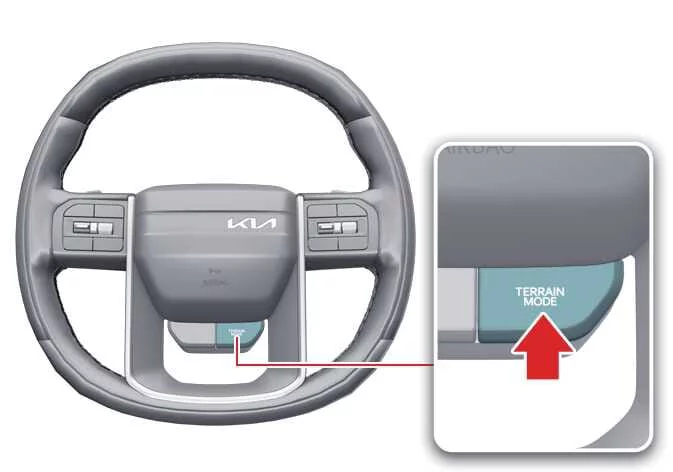
|
Press the TERRAIN MODE button to switch from DRIVE MODE to TERRAIN MODE. Continue pressing the button to select the desired driving mode, including SNOW, MUD, or SAND, depending on current road conditions.
Press the DRIVE MODE button at any time to return the Kia Telluride to normal driving mode.
TIP
Even if the vehicle is turned off while TERRAIN MODE is active, the Kia Telluride automatically returns to DRIVE MODE the next time the vehicle is started.
TERRAIN MODE selection
|
TERRAIN MODE |
Description |
|---|---|
|
- |
|
|
SNOW |
SNOW mode optimizes traction distribution to help minimize wheel slip and improve stability when driving on snow-covered, icy, or otherwise slippery road surfaces. This mode allows the Kia Telluride to deliver smoother and more confident acceleration under reduced-traction conditions. |
|
MUD |
MUD mode adjusts engine output, transmission response, and AWD torque distribution to provide improved grip and control while driving on muddy, rough, or unpaved roads where additional traction is required. |
|
SAND |
SAND mode is designed for loose surfaces such as sand, gravel, or similar unpaved terrain. It modifies power delivery and traction management to help maintain forward momentum and improve vehicle stability in these conditions. |
NOTE
-
Keep the Kia Telluride in DRIVE MODE during normal everyday driving. Using TERRAIN MODE on dry, paved roads for extended periods is unnecessary and may lead to increased drivetrain load, mechanical vibration, or additional operating noise.
-
While driving in TERRAIN MODE, particularly when cornering on normal paved roads, you may notice slight drivetrain vibration or mechanical noise. These characteristics are normal and do not indicate a malfunction. Once TERRAIN MODE is canceled, the vibration or noise disappears. You may also feel a slight jolt as the front and rear wheel torque distribution returns to its standard operating state, which is a normal characteristic of the AWD system.
 All Wheel Drive (AWD): (if equipped)
The available All Wheel Drive (AWD) system in the Kia Telluride automatically distributes engine power between the front and rear wheels to improve traction and overall vehicle stability...
 Safe AWD operation
Before driving Mastering the dynamics of an All-Wheel Drive (AWD) vehicle is essential for confident driving. Do not rely exclusively on your habits from conventional Front-Wheel Drive (FWD) vehicles; the Kia Telluride AWD system provides different handling characteristi..
Other information:
Kia Telluride (LQ2, 2027-2026) Owner's Manual: All Wheel Drive (AWD): (if equipped)
The available All Wheel Drive (AWD) system in the Kia Telluride automatically distributes engine power between the front and rear wheels to improve traction and overall vehicle stability. This helps maximize driving performance on challenging surfaces such as steep hills, loose gravel, wet pavement, snow, mud, or other low-traction roads.
Kia Telluride (LQ2, 2027-2026) Owner's Manual: Parking Distance Warning malfunction
Check Driver Assistance system If a operational issue or electrical problem occurs within the Parking Distance Warning system or its associated sensors and sub-components, the instrument cluster promptly alerts the driver by displaying a clear warning message.