
Kia Telluride: Automatic climate control system / Automatic heating and air conditioning (A/C) operation

|
-
Tap the AUTO icon on the climate control panel. This activates the intelligent climate management system in your Kia Telluride. Once enabled, the vehicle automatically regulates air distribution modes, fan speeds, air intake, and the air-conditioning compressor to maintain your precisely set cabin temperature, ensuring optimal comfort without manual intervention.
Level
Indicator
LCD Display
Air flow
High


2–8
Medium


1–6
Low


1–4
-
Push the temperature control lever up or down to achieve your desired cabin climate. The Kia Telluride will then adjust all internal systems to reach and maintain that specific temperature setting efficiently.
TIP
-
To exit automatic operation and regain manual command, simply press any of the following adjustments:
-
Mode selection lever or icon
-
Air conditioning A/C toggle icon
-
Front windshield defroster icon. To cancel the defrosting function, press the icon again; the AUTO indicator will reappear on the display, confirming that the system has resumed automated management.
-
Fan speed control lever
In these instances, the specific function you adjusted will remain in manual control, while the remaining climate settings continue to operate autonomously.
-
-
To achieve the most effective climate regulation in your Kia Telluride, we recommend pressing the AUTO icon and maintaining a set temperature of 72 °F (22 °C).
TIP
|
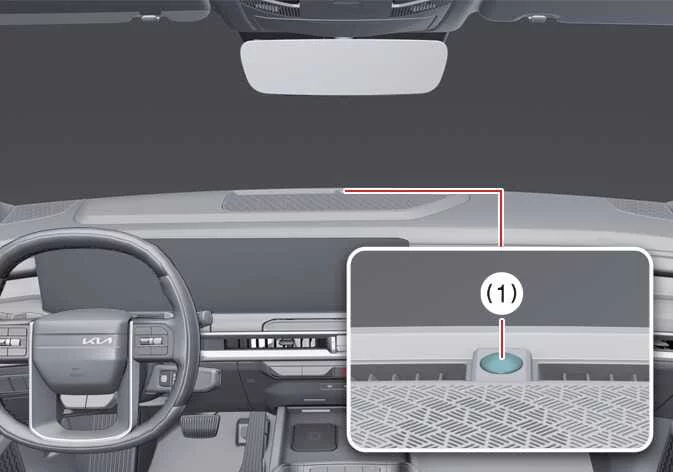
For precise heating and cooling performance, ensure the climate control sensor (1) located on the top of the instrument panel remains unobstructed. Placing items over this sensor can interfere with the system's ability to accurately gauge the interior environment.
 Automatic climate control system
The automatic climate control system helps heat, cool, ventilate, and dehumidify the Kia Telluride cabin to provide a comfortable environment for the driver and passengers...
 Manual heating and air conditioning (A/C) operation
If you prefer to tailor your environment manually, the Kia Telluride allows you to override automatic settings by interacting directly with the climate control buttons, effectively disengaging the AUTO function...
Other information:
Kia Telluride (LQ2, 2027-2026) Owner's Manual: Headlight delay function
If the vehicle is switched to the OFF or ACC position while the headlamps are on, both the headlamps and position lamps will remain illuminated for approximately five minutes, helping light your path after leaving the vehicle. After the vehicle is turned off, opening and then closing the driver's door will cause the headlamps and position lamps to switch off automatically after approximately 15 seconds.
Kia Telluride (LQ2, 2027-2026) Owner's Manual: Interior care
Use the detailed guidelines, professional cleaning techniques, and preventative maintenance recommendations outlined in the following sections to properly care for and preserve the immaculate cabin condition of your Kia Telluride. Interior general precautions Prevent harsh chemical agents such as personal perfumes, cosmetic oils, facial sunscreens, hand cleaners, and liquid air fresheners from coming into direct contact with the sensitive interior trim parts of your Kia Telluride, because these substances can easily cause permanent chemical damage, staining, or surface discoloration.