
Kia Telluride: Steering wheel / Steering wheel heater: (if equipped)
When the ENGINE START/STOP button is in the ON position, press the heated steering wheel button to activate the steering wheel heater. Once activated, the indicator light on the switch illuminates to confirm operation.
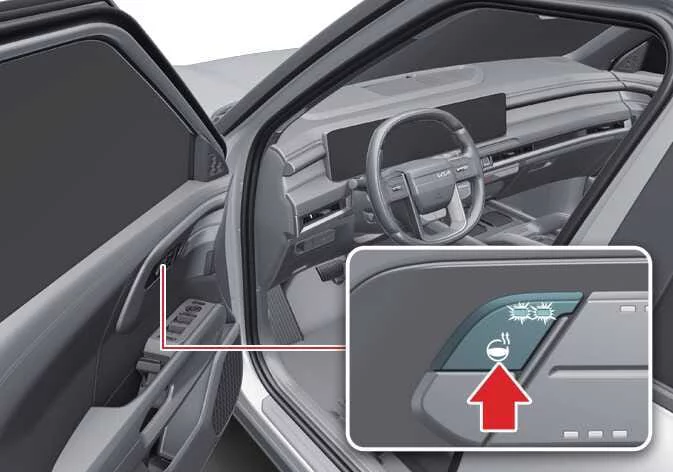
|
-
Press the heated steering wheel button once to switch the system on. The indicator light will illuminate and the steering wheel will begin warming shortly afterward.
-
To reduce the possibility of low-temperature burns during extended use, the Kia Telluride automatically adjusts the steering wheel temperature after the heater has been activated.
Steering wheel heater level
Operating time
Off
-
2 (Strong)
30 minutes
1 (Weak)
Until restart
-
When the heater is operating at Level 2 (Strong), it automatically changes to Level 1 (Weak) after approximately 30 minutes of continuous operation.
-
If no additional adjustments are made by the driver, the heater remains at Level 1 (Weak) until the vehicle is switched off.
-
-
To switch the heated steering wheel off, press and hold the steering wheel heater button until the indicator light turns off.
NOTE
-
Do not install steering wheel covers or grip wraps, as they may reduce heating efficiency and interfere with the normal operation of the heated steering wheel system.
-
When cleaning the heated steering wheel, avoid using paint thinner, benzene, gasoline, alcohol, or other organic solvents. These products may damage the steering wheel surface.
-
Avoid striking the steering wheel with sharp or pointed objects, as they may damage the internal heating elements.
WARNING
If the steering wheel becomes excessively warm, switch the heater off immediately. Prolonged contact with a heated steering wheel may cause low-temperature burns, particularly during extended driving.
 Tilt and telescopic steering wheel. Adjusting steering wheel angle and height
The tilt and telescopic steering wheel allows you to adjust both the height and the distance of the steering wheel before driving, helping you achieve a comfortable seating position while maintaining full control of the vehicle...
 Steering wheel grip sensor
While the Kia Telluride Driver Assistance systems are operating, the steering wheel grip sensor monitors whether the driver is holding the steering wheel...
Other information:
Kia Telluride (LQ2, 2027-2026) Owner's Manual: Mechanical key
If the smart key battery becomes discharged or the Kia Telluride smart key does not operate normally, you can still lock or unlock the vehicle by using the built-in mechanical key (2). Mechanical key protective cover Mechanical key To remove the mechanical key, carefully pull the mechanical key protective cover (1) away from the smart key until the mechanical key can be accessed and removed.
Kia Telluride (LQ2, 2027-2026) Owner's Manual: Drive mode integrated control system. DRIVE MODE
The drive mode integrated control system in the Kia Telluride allows the driver to choose a driving mode that best matches current road conditions, the surrounding environment, or personal driving preference. DRIVE MODE You can select a suitable drive mode based on your preferred driving feel or the condition of the road ahead.