
Kia Telluride: Lane Keeping Assist (LKA) / Lane Keeping Assist operation
Turning Lane Keeping Assist ON and OFF
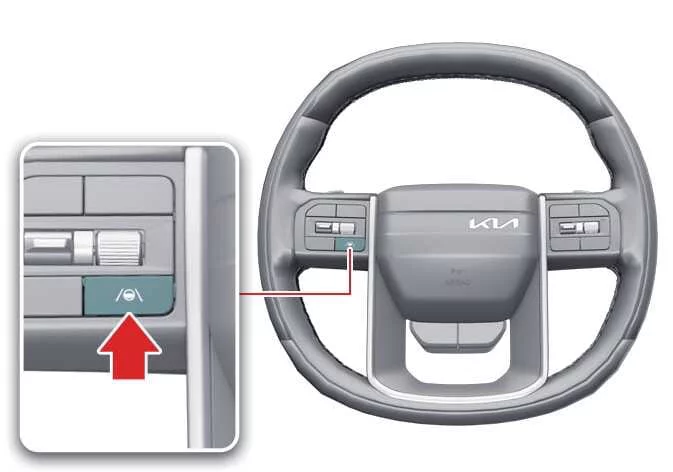
|
To switch Lane Keeping Assist ON or OFF, press and hold the Lane Driving Assist ( ) button on the steering wheel for more than two seconds while the vehicle is ON.
When Lane Keeping Assist is enabled, a gray or green indicator ( ) appears on the instrument cluster to show the current operating status.
TIP
-
If the operating conditions for Lane Keeping Assist have not yet been satisfied, the gray indicator (
 ) is displayed on the instrument cluster.
-
Once all operating conditions are met, the indicator changes to green (
 ), confirming that the system is actively monitoring lane position.
Automatic Activation
Lane Keeping Assist is automatically enabled in the following driving situations:
-
When both Lane Following Assist (LFA) and Smart Cruise Control (SCC) are active.
-
When Highway Driving Assist (HDA) is active.: (if equipped)
If Lane Keeping Assist is automatically activated under these conditions, attempting to switch it off will display a warning message, and the function will remain enabled.
To deactivate Lane Keeping Assist, temporarily turn off Smart Cruise Control or disable the related driving assistance features by pressing the Lane Driving Assist or Driving Assist button, then try switching Lane Keeping Assist off again.
WARNING
When the driving assistance functions are turned off, Lane Keeping Assist automatically returns to its previously selected setting.
Warning and control
Lane Keeping Assist provides the following warning and steering support functions:
-
Lane Departure Warning
-
Lane Keeping Assist
|
|
Lane Departure Warning
Lane Departure Warning notifies the driver through a green indicator (), a flashing lane indicator in the direction of departure, an audible alert, and steering wheel vibration.
Lane Departure Warning may operate under the following conditions:
-
Your driving speed is approximately 40-120 mph (60-200 km/h).
-
Road conditions are suitable for system operation, including lane width, road curvature, and recognizable lane markings.
Lane Keeping Assist
The green indicator () flashes on the instrument cluster while the system provides steering assistance to help keep the Kia Telluride within its current lane.
Lane Keeping Assist may operate under the following conditions:
-
Your driving speed is approximately 40-120 mph (60-200 km/h).
-
Road conditions are appropriate for reliable lane recognition, including lane width and roadway curvature.
WARNING
Lane Keeping Assist does not operate when vehicle speed is below 35 mph (55 km/h) or above 130 mph (210 km/h).
Hands-off warning
|
|
|
If the driver removes both hands from the steering wheel for several seconds, a warning message appears on the instrument cluster and an audible warning is issued in progressive stages.
The Hands-off warning is canceled as soon as the driver grips the steering wheel again.
WARNING
-
Steering assistance may not activate if the steering wheel is held too firmly or turned beyond a certain angle.
-
Lane Keeping Assist does not operate in every driving situation. The driver is always responsible for steering the Kia Telluride safely and maintaining proper lane position.
-
The Hands-off warning may appear later than expected depending on road conditions. Always keep both hands on the steering wheel while driving.
-
If you are wearing gloves or holding the steering wheel very lightly, the system may not recognize your grip and the Hands-off warning may appear.
-
Attaching accessories or objects to the steering wheel may interfere with proper Hands-off warning operation.
TIP
-
Even while Lane Keeping Assist is providing steering assistance, the driver can always override the steering input.
-
The steering wheel may feel slightly heavier or lighter than normal while Lane Keeping Assist is actively assisting steering.
-
If the interior camera detects an abnormal driver condition, Lane Keeping Assist may intervene earlier than usual.: (if equipped)
-
For additional safety, steering effort may increase in the following situations:
-
When the driver appears inattentive, such as not looking ahead or toward the direction of lane departure, or when a Hands-Off warning has been issued.
-
When another vehicle is approaching in the same direction within the lane toward which the vehicle is drifting.
-
When an oncoming vehicle is approaching in the lane toward which the vehicle is departing across the center line.
-
-
Once lane markings are recognized, the lane indicators displayed on the instrument cluster change from gray to white.
Figure 1. Lane undetected
Figure 2. Lane detected 
-
The lane markings shown on the instrument cluster may differ slightly from the actual lane markings on the road.
-
For more information about instrument cluster configuration, refer to the LCD display section.
-
If Highway Lane Change Assist is selected, a green lane indicator is displayed on the instrument cluster.: (if equipped)
-
The appearance of displayed images and colors may vary depending on the instrument cluster specifications or the selected display theme.
 Lane Keeping Assist settings
Lane Safety Driver Assistance Driving Safety Lane Safety While the vehicle is ON, tap Setup > Vehicle > Driver Assistance > Driving Safe..
 Lane Keeping Assist malfunction and limitations
Lane Keeping Assist malfunction Check Driver Assistance system If Lane Keeping Assist detects a malfunction, the Master warning light () and the yellow Lane Keeping Assist indicator () illum..
Other information:
Kia Telluride (LQ2, 2027-2026) Owner's Manual: AI Assistant: (if equipped)
If equipped, the AI Assistant allows you to interact with your Kia Telluride using natural voice commands. The system can help operate selected vehicle functions and respond to a variety of general questions through voice recognition, making everyday interactions more convenient while keeping your hands on the wheel whenever possible.
Kia Telluride (LQ2, 2027-2026) Owner's Manual: Forward Attention Warning (FAW): (if equipped)
Forward Attention Warning uses the in-cabin camera to help reduce driver distraction while the Kia Telluride is being driven. When the system determines that the driver’s attention is not directed toward the road, it can provide an audible warning and display a warning light to help the driver refocus.