
Kia Telluride: Driver adjustments / Integrated memory system: (if equipped)
The Integrated Memory System allows your Kia Telluride to save and recall multiple driver preferences with a single button press, making it easy for different drivers to restore their preferred seating and driving position.
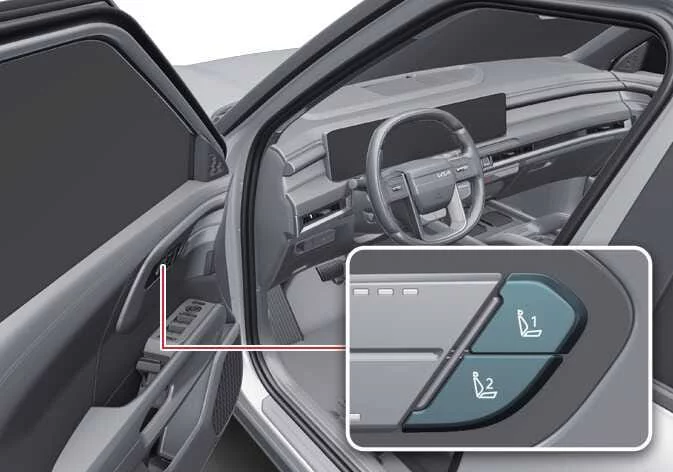
|
-
Driver's seat position
-
Outside rearview mirror position
-
Steering wheel position
-
Head-Up Display (HUD) settings
WARNING
Never operate the Integrated Memory System while your Kia Telluride is moving.
Unexpected seat, steering wheel, or mirror movement could distract the driver, reduce vehicle control, and increase the risk of a collision that could result in serious injury, death, or property damage.
NOTE
-
If the vehicle battery is disconnected or completely discharged, all stored memory positions will be erased and must be programmed again.
-
If the Integrated Memory System does not operate as expected, have your Kia Telluride inspected by an authorized Kia dealer to ensure proper system operation.
Storing memory positions
- Shift the transmission into P (Park) while the ENGINE START/STOP button is in the ON position.
- Adjust the driver's seat, outside rearview mirrors, steering wheel, and Head-Up Display to your preferred driving positions before saving them.
- Press and hold the desired memory button (1 or 2). A confirmation chime will sound, and the infotainment display will show the message, "Driver 1 (or 2) settings saved." Your customized Kia Telluride driving profile is now stored for future use.
Recalling memory positions
- Place the transmission in P (Park) with the ENGINE START/STOP button in the ON position.
-
Press the previously programmed memory button (1 or 2). After a confirmation chime, the driver's seat, outside mirrors, steering wheel, and Head-Up Display will automatically move to the stored positions.
The infotainment system will display "Driver 1 (or 2) settings applied."
Seat easy access
The Seat Easy Access feature automatically adjusts the driver's seat and steering wheel to make entering and exiting your Kia Telluride more comfortable.
Exiting the vehicle
-
When the ENGINE START/STOP button is switched to the OFF position, the transmission is in P (Park), and the driver's door is opened, the system automatically activates.
-
Driver's seat: The seat moves rearward according to the distance selected in the infotainment Settings menu.
If there is insufficient clearance between the driver's seat and the rear seats, the seat may not move its full programmed distance.
Entering the vehicle:
The driver's seat automatically returns to its memorized driving position when the ENGINE START/STOP button is switched to the ACC, ON, or START position, or when the driver's door is closed while carrying the Smart Key with the ENGINE START/STOP button in the OFF position.
-
Driver's seat: Automatically returns to the previously stored driving position.
The Seat Easy Access feature can be customized through the infotainment system.
-
Driver's seat: Select Settings > Vehicle > Seats > Seat Easy Access > Driver Seat Easy Access on the infotainment display.
Resetting the system
If the Integrated Memory System in your Kia Telluride does not operate correctly, perform the following reset procedure.
Resetting the integrated memory system
- Stop the vehicle, shift into P (Park), switch the ENGINE START/STOP button to the ON position, and open the driver's door.
- Move both the driver's seat cushion and seatback to their forward-most positions.
- Press and hold Memory Button 1 (or 2) while simultaneously pushing the driver's seat adjustment switch forward for more than two seconds.
While resetting the integrated memory system
-
A notification chime confirms that the reset process has started.
-
The driver's seat and seatback automatically move to the fully rearward position while another notification chime sounds.
-
The seat then automatically returns to its factory default (center) position with an additional notification sound.
The reset process will stop if any of the following occurs:
-
A memory button is pressed.
-
The driver's seat adjustment switch is operated.
-
The transmission is shifted out of P (Park).
-
Vehicle speed exceeds 3 mph (5 km/h).
-
The driver's door is closed.
TIP
-
If the reset procedure stops before it finishes, simply repeat the entire process from the beginning.
-
Before starting the reset, ensure there are no objects around or behind the driver's seat that could interfere with seat movement.
-
After completing the reset, store your preferred driver's seat settings again before attempting to recall them with the memory buttons.
-
 Reverse parking aid function: (if equipped)
When the transmission is shifted into the R (Reverse) position, the outside rearview mirrors can automatically tilt downward to provide a clearer view of the area near the vehicle, making reverse parking in your Kia Telluride more convenient and precise...
 Instrument cluster
Figure 1. Type A Figure 2. Type B The appearance of the instrument cluster may vary depending on your Kia Telluride model, trim level, or optional equipment...
Other information:
Kia Telluride (LQ2, 2027-2026) Owner's Manual: Deactivating the ISG
To deactivate ISG, press the ISG OFF button. The indicator light on the button illuminates. To reactivate ISG, press the ISG OFF button again. The indicator light on the button turns off.
Kia Telluride (LQ2, 2027-2026) Owner's Manual: Bulb wattage
* : if equipped Light bulb Bulb type Wattage (Watt) Front High beam LED LED Low beam LED LED Auxiliary low beam LED LED Position and daytime running lights LED LED Turn signal lamps LED LED Front fog lamps* LED LED Front side marker lamps LED LED Rear Stop and tail lamps LED LED Turn signal lamps LED LED Side marker lamps LED LED Back up lamps LED LED High mounted stop lamps LED LED License plate lamps LED LED Interior Map lamps LED LED Room lamps LED LED Personal lamps LED LED Vanity mirror lamps LED LED Glove box lamp* LED LED Center console storage lamp* LED LED Luggage compartment light* LED LED Ambient light* LED LED Liftgate light* LED LED