
Kia Telluride: Highway Driving Assist (HDA): (if equipped) / Highway Driving Assist settings
|
|
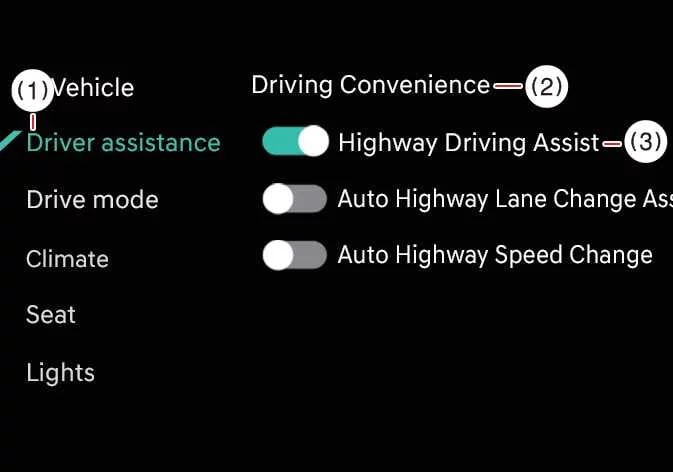
While the vehicle is ON, open Setup > Vehicle > Driver Assistance > Driving Convenience on the infotainment screen to configure the available Highway Driving Assist options.
When Highway Driving Assist is enabled, the Kia Telluride can assist with maintaining the selected cruising speed, a safe following distance, and proper lane positioning during compatible highway driving.
Highway Lane Change Assist: (if equipped)
If Highway Lane Change Assist is enabled, the system can provide support for lane changes when the required operating conditions are satisfied.
WARNING
For your safety, adjust Highway Driving Assist settings only after the vehicle has been parked in a safe location.
CAUTION
-
Towing a trailer or installing an external carrier can affect vehicle stability. Disable the function if necessary and always operate the vehicle with additional caution.
-
Do not rely on Highway Driving Assist when towing another vehicle or when accessories that may interfere with sensor operation or vehicle balance are installed.
-
Highway Lane Change Assist, when equipped, may not perform correctly if a trailer, cargo carrier, or similar equipment is attached. Avoid using the feature under these conditions.
-
When a trailer or carrier is connected, configure the corresponding trailer or carrier menu if available. Whether recognized automatically through genuine accessories or selected manually, some Kia Telluride driver assistance functions may become limited. Refer to the Driver Assistance System limitations section and continue driving attentively.
TIP
-
Highway Driving Assist must already be active before Highway Lane Change Assist can be used.
-
If Highway Lane Change Assist cannot be enabled because of a system fault, have the Kia Telluride inspected by an authorized Kia dealer.
-
Both Highway Driving Assist and Highway Lane Change Assist retain their previously selected settings after the vehicle is turned off and restarted.
Warning Methods
|
|
While the vehicle is ON, open Setup > Vehicle > Driver Assistance > Warning Methods on the infotainment display to customize how the Kia Telluride delivers driver assistance notifications. The following options are available:
-
Warning Volume: Adjusts the loudness of audible warning tones generated by the driver assistance systems.
-
Driving Safety Priority: Temporarily lowers the volume of other audio sources whenever a driving safety warning is issued so important alerts can be heard more clearly.
TIP
-
The selected Warning Methods configuration may also be shared with other Kia Telluride driver assistance features that use the same notification settings.
-
Your customized Warning Methods preferences remain stored after the vehicle is turned OFF and restarted.
-
Depending on the vehicle trim level, software version, or market specification, some Warning Methods menu items may not be available.
 Highway Driving Assist (HDA): (if equipped)
Highway Driving Assist Highway Driving Assist helps the Kia Telluride maintain the selected speed, an appropriate following distance, and a centered lane position by monitoring lane markings and surrounding traffic...

Other information:
Kia Telluride (LQ2, 2027-2026) Owner's Manual: Armrest
Armrest (2nd row seat, for 8 passenger vehicle) To use the second-row armrest in an 8-passenger Kia Telluride, pull it forward from the seatback until it rests in the usable position.
Kia Telluride (LQ2, 2027-2026) Owner's Manual: Surround View Monitor malfunction and limitations
Surround View Monitor malfunction If Surround View Monitor malfunctions, the image on the display may appear green, blue, black, distorted, or otherwise abnormal. Have the Kia Telluride inspected by an authorized Kia dealer if Surround View Monitor does not operate correctly, if the screen flickers, or if the camera image is not displayed properly.