
Kia Telluride: Driver Attention Warning (DAW) / Driver Attention Warning settings
|
|
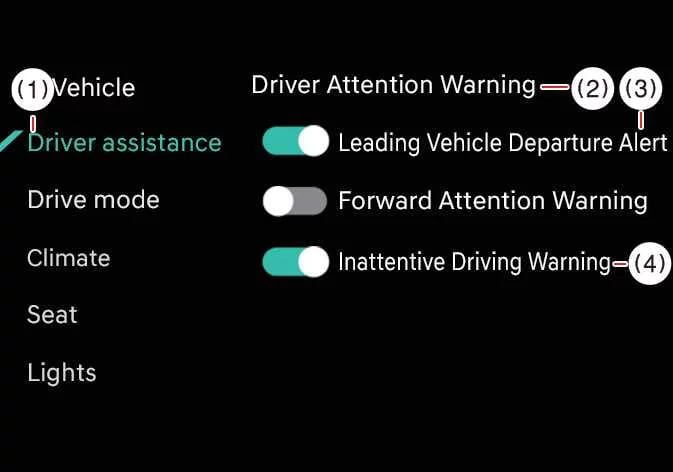
While the vehicle is ON, tap Setup > Vehicle > Driver Assistance > Driver Attention Warning on the infotainment system screen to adjust the available DAW functions.
-
Leading Vehicle Departure Alert: Driver Attention Warning informs the driver when a detected vehicle in front starts moving from a stopped position.
-
Inattentive Driving Warning: The Inattentive Driving Warning function of DAW can be turned on or off according to the driver’s preference.
 Driver Attention Warning (DAW)
Driver Attention Warning function Driver Attention Warning monitors the driver’s behavior and driving pattern while the Kia Telluride is in motion. If the system determines that the driver’s attention has dropped below a certain level, it recommends taking a break to support safer and more atte..
 Driver Attention Warning operation
Inattentive Driving Warning function The main purpose of Driver Attention Warning is to advise the driver to take a break when the system detects signs of reduced attention during driving...
Other information:
Kia Telluride (LQ2, 2027-2026) Owner's Manual: Steering wheel grip sensor
While the Kia Telluride Driver Assistance systems are operating, the steering wheel grip sensor monitors whether the driver is holding the steering wheel. If the system determines that the driver's hands are not detected, a Hands-off warning message will appear to encourage the driver to resume proper steering control.
Kia Telluride (LQ2, 2027-2026) Owner's Manual: Removing and storing the spare tire
The compact spare tire is mounted externally under the rear chassis of your Kia Telluride, directly beneath the cargo floor structure. Removing the spare tire To lower and release the spare tire assembly from its underbody carrier, follow these steps: Open the rear liftgate to access the trunk area.