
Kia Telluride: Instrument cluster / Adjusting instrument cluster illumination
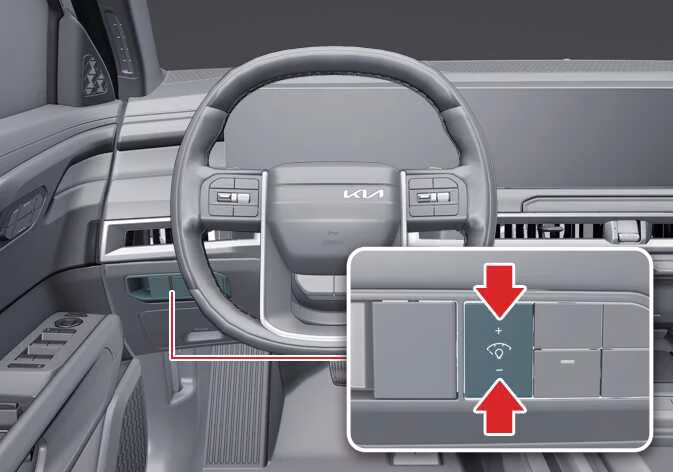
You can customize the brightness of the instrument cluster illumination by pressing the illumination control buttons ("+" or "-") whenever the ENGINE START/STOP button is in the ON position or when the exterior lights are switched ON. Adjusting the brightness allows the Kia Telluride instrument panel to remain comfortable to read during both daytime and nighttime driving.
|
WARNING
Never adjust the brightness of the instrument cluster while driving. Diverting your attention from the road may reduce vehicle control and increase the risk of an accident that could result in serious injury, death, or property damage.
 Transmission shift indicator. Automatic transmission shift indicator
The transmission shift indicator provides a clear visual display of the currently selected gear, allowing the driver of the Kia Telluride to quickly confirm the transmission operating mode while driving or when the vehicle is stationary...
 Warning and indicator lights
The warning and indicator lights in the Kia Telluride provide important information about the operating status of vehicle systems. They notify the driver when specific functions are active and alert you whenever a system requires attention or immediate action, helping you operate the vehicle safely ..
Other information:
Kia Telluride (LQ2, 2027-2026) Owner's Manual: Operating the power liftgate
Power liftgate open/close button (smart key, instrument panel): (if equipped) Press and hold the power liftgate open/close button for approximately one second.
Kia Telluride (LQ2, 2027-2026) Owner's Manual: Headrest (for front seat)
The driver's and front passenger's seats in the Kia Telluride are equipped with adjustable headrests designed to enhance both occupant comfort and overall safety. In addition to providing everyday comfort, the headrest plays an important role in helping reduce the risk of head and neck injuries during certain types of collisions.