
Kia Telluride: Surround View Monitor (SVM): (if equipped) / Surround View Monitor operation
Parking/View button
|
(1) Parking/View button
Press the Parking/View button (1) to turn Surround View Monitor ON.
Press the same button again to turn Surround View Monitor OFF.
Front-view
|
|
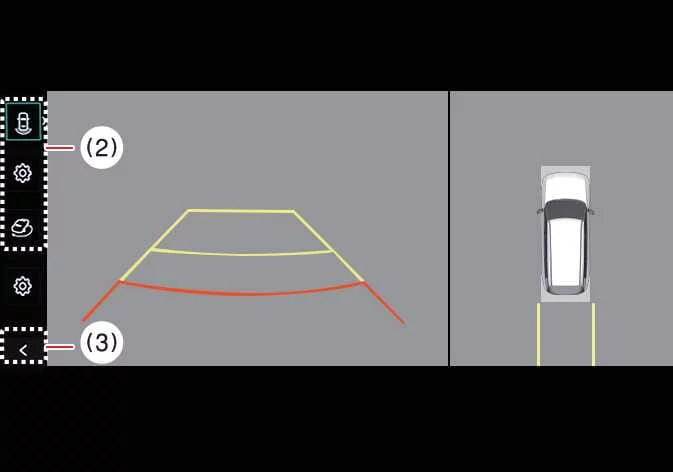
(2) View switching button
(3) Back button
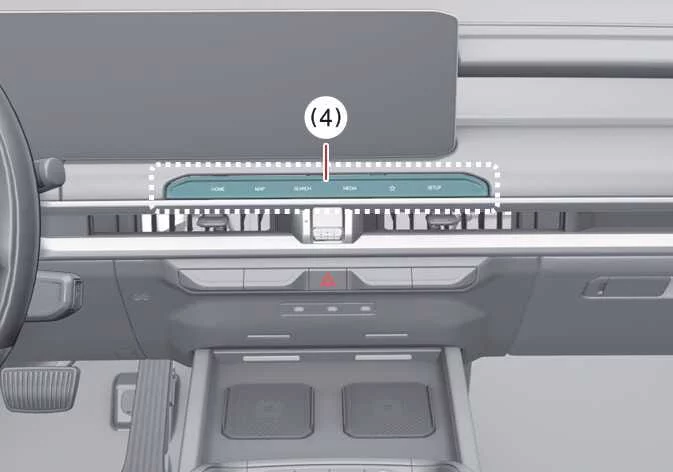
(4) Infotainment system operation button
The front-view function helps support safer low-speed parking by showing the area in front of the Kia Telluride on the infotainment display according to the selected camera view and settings.
Parking
The Front-view function of Surround View Monitor activates during parking under the following conditions:
-
The gear is in P (Park), N (Neutral), or D (Drive), vehicle speed is below 6 mph (10 km/h), and the Parking/View button (1) is pressed.
-
The gear is shifted from R (Reverse) to N (Neutral) or D (Drive) while vehicle speed is below 6 mph (10 km/h).
-
Forward Parking Distance Warning activates while the gear is in D (Drive).
*(This applies when Setup > Vehicle > Driver Assistance > Parking Safety > Surround View Monitor Auto On is selected on the infotainment system screen.)
Press the view switching button (2) on the Surround View Monitor screen to choose Top View, Front View, Side View, or Wide View.
The front-view function of Surround View Monitor turns OFF during parking under the following conditions:
-
The gear is shifted to P (Park) or R (Reverse).
-
The Parking/View button (1) is pressed.
-
The back button (3) on the Surround View Monitor screen is pressed.
-
The infotainment system power or operation button (4) is pressed.
-
The Kia Telluride is driven faster than 6 mph (10 km/h).
TIP
When the Surround View Monitor Front View activates, the system displays the most recently used view.
Rear-view
|
|
|
(2) View switching button
(3) Back button
(4) Infotainment system operation button
The Rear-view function of Surround View Monitor helps support safer parking by showing the area behind the Kia Telluride on the infotainment display according to the selected camera view and settings.
Parking
The Rear-view function of Surround View Monitor activates during parking under the following conditions:
-
The Parking/View button (1) is pressed, then Rear View is selected with the view switching button (2) while the gear is in P (Park), N (Neutral), or D (Drive) and vehicle speed is below 6 mph (10 km/h).
-
The gear is shifted to R (Reverse).
Press the view switching button (2) on the Surround View Monitor screen to choose Top View, Front View, Side View, or Wide View.
The Rear-view function of Surround View Monitor turns OFF during parking under the following conditions when the gear is in P (Park), N (Neutral), or D (Drive):
-
The gear is shifted from N (Neutral) or D (Drive) to P (Park).
-
The Parking/View button (1) is pressed.
-
The back button (3) on the Surround View Monitor screen is pressed.
-
The infotainment system power button (4) is pressed.
-
The vehicle is driven faster than 6 mph (10 km/h).
The Rear-view function of Surround View Monitor turns OFF when the gear is shifted from R (Reverse) to P (Park).
TIP
-
Rear View is always displayed when the gear is shifted to R (Reverse).
-
When the gear is in R (Reverse), the camera video does not turn OFF even if the infotainment system power button (4) is pressed.
3D View function
|
|
|
(2) View switching button
(3) Back button
(4) Infotainment system operation button
The 3D View function of Surround View Monitor shows the Kia Telluride from multiple virtual angles, helping the driver understand the vehicle’s position in tight parking areas. To choose a viewing angle, press the 3D View icon on the Surround View Monitor screen. To return the view angle to its default position, press the 3D View icon again.
The 3D View function of Surround View Monitor activates under the following conditions:
-
The gear is shifted to P (Park), N (Neutral), or D (Drive), and vehicle speed is below 6 mph (10 km/h).
-
The view switching button (2) is pressed to select 3D View while the gear is in R (Reverse) and Surround View Monitor is operating.
The 3D View function of Surround View Monitor turns OFF during parking under the following conditions:
-
The gear is shifted from N (Neutral) or D (Drive) to P (Park).
-
The Parking/View button (1) is pressed.
-
The back button (3) on the Surround View Monitor screen is pressed.
-
The infotainment system power button (4) is pressed.
-
The vehicle is driven faster than 6 mph (10 km/h).
-
The gear is shifted from R (Reverse) to P (Park).
When the vehicle is in R (Reverse), the 3D View function of Surround View Monitor turns off under the following condition:
-
The gear is shifted to P (Park).
TIP
-
Parking guidelines are not displayed in 3D View.
-
The Top View screen, which can display Front View, Rear View, or 3D View, uses images captured by the vehicle’s 4 wide-view cameras and converts them into a 360-degree overhead-style image around the Kia Telluride.
-
Top View is not displayed when Front Wide View or Rear Wide View is selected.
-
Pinch the Top View area on the display to zoom in or out.
 Surround View Monitor settings
Warning Methods Driver Assistance Warning Methods To adjust Warning Methods while the vehicle is ON, select Setup > Vehicle > Driver Assistance > Warning Meth..
 Surround View Monitor malfunction and limitations
Surround View Monitor malfunction If Surround View Monitor malfunctions, the image on the display may appear green, blue, black, distorted, or otherwise abnormal...
Other information:
Kia Telluride (LQ2, 2027-2026) Owner's Manual: Owner maintenance. Owner maintenance schedule
The following owner maintenance schedules outline essential visual inspections, fluid checks, and mechanical verifications that should be carried out by the driver or an authorized Kia dealer at designated intervals to maintain the safe, efficient, and dependable operation of your Kia Telluride.
Kia Telluride (LQ2, 2027-2026) Owner's Manual: Releasing the parking brake
Releasing the parking brake with EPB switch Turn the vehicle on. Firmly depress the brake pedal. Press the EPB switch. Confirm that the brake warning indicator has turned off.