
Kia Telluride: Opening and closing / Smart liftgate with auto open: (if equipped)
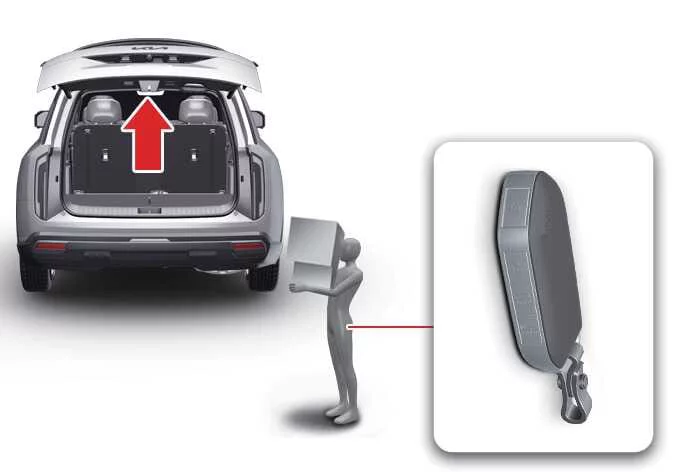
On Kia Telluride models equipped with a smart key, the Smart Liftgate with AUTO Open function provides convenient hands-free access to the cargo area. When the system detects the authorized smart key near the rear of the vehicle, it can automatically open the liftgate without requiring you to press any buttons.
|
How to use the smart liftgate with auto open
The Kia Telluride Smart Liftgate with AUTO Open allows you to access the cargo area without pressing any buttons. When the required operating conditions are met and you carry a recognized smart key, the system automatically detects your presence and opens the liftgate for added convenience.
The hands-free liftgate function operates under the following conditions:
-
At least 15 seconds have passed after all doors have been completely closed and locked.
-
You remain within the detection area for more than 3 seconds while carrying the registered smart key.
TIP
The Smart Liftgate with AUTO Open on the Kia Telluride will not operate under the following conditions:
-
The smart key is detected continuously during the first 15 seconds after all doors have been locked.
-
The smart key remains within 60 in (1.5 m) of the front door handles during the first 15 seconds after locking (vehicles equipped with Welcome Light).
-
Any door is not fully closed or remains unlocked.
-
The smart key has been left inside the vehicle.
- Setting
To enable the Kia Telluride Smart Liftgate with AUTO Open, navigate to Setup > Vehicle > Door > Smart Liftgate within the infotainment system and activate the feature.
- Detect and alert
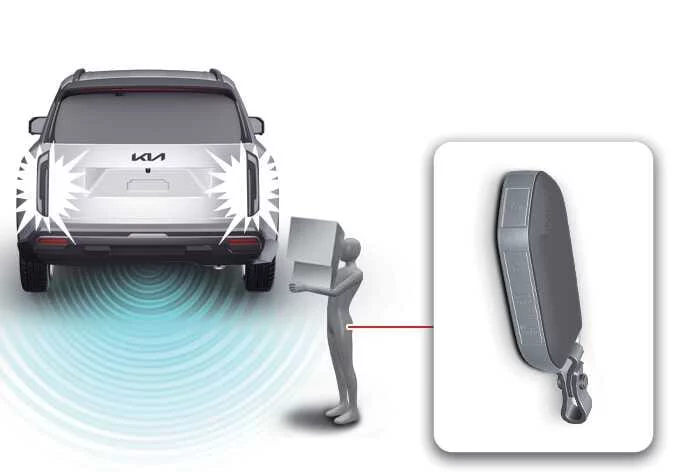
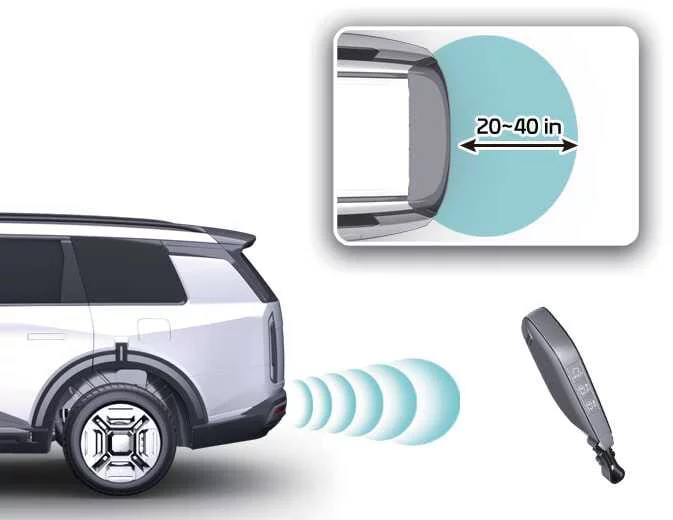
When you stand within the detection zone, approximately 20–40 in (50–100 cm) behind the Kia Telluride while carrying the smart key, the system recognizes the key. The hazard warning lamps flash and a chime sounds to notify you that the vehicle has detected your presence. The liftgate will then begin its automatic opening sequence.
TIP
If you do not intend to open the liftgate, avoid entering the detection area. If the warning lamps begin flashing and the chime sounds unintentionally, simply move away from the rear of the vehicle with the smart key. The liftgate will remain closed and the operation will be canceled.
- Automatic opening
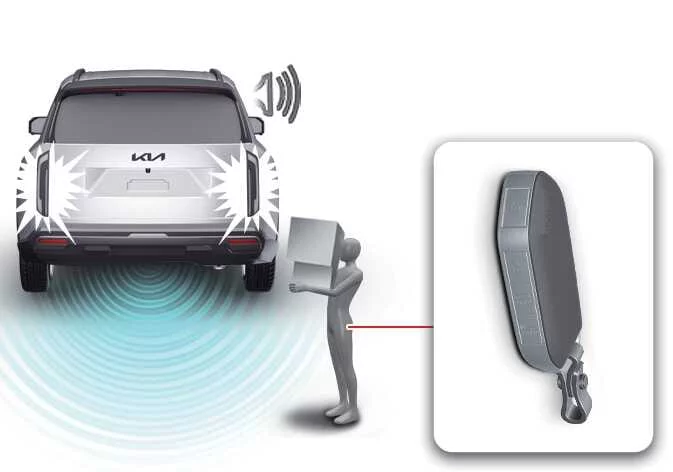
After detection is confirmed, the hazard warning lights flash and the warning chime sounds six times before the liftgate automatically opens.
WARNING
-
Before driving your Kia Telluride, always confirm that the liftgate is completely closed and securely latched.
-
Check that no people, pets, or nearby objects are within the liftgate's operating path before automatic opening or closing begins.
-
When parked on an incline, ensure that loose cargo cannot slide out as the liftgate opens, since this could result in injury or property damage.
-
Disable the Smart Liftgate with AUTO Open before using an automatic car wash to prevent unintended liftgate operation.
-
Keep the smart key away from children. Accidental activation near the rear of the vehicle could cause the liftgate to open unexpectedly.
NOTE
Liftgate gas lifters
Always close the liftgate completely before driving. Operating the vehicle with the liftgate open or partially latched may damage the liftgate gas struts and related hardware.
-
How to deactivate the smart liftgate with auto open function using the smart key
|
|





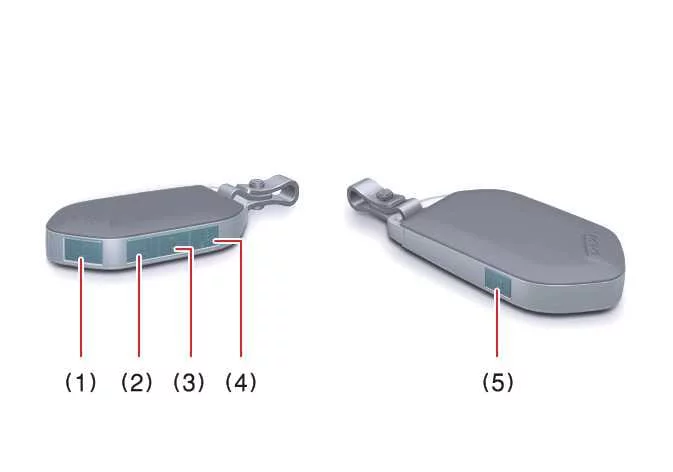
If you press any button on the smart key while the system is in the Detect and Alert stage, the Kia Telluride Smart Liftgate with AUTO Open function will be canceled for that operating cycle.
Become familiar with this deactivation method so you can quickly stop automatic liftgate operation whenever necessary.
TIP
-
If you press the door unlock button (2), the Smart Liftgate with AUTO Open feature is temporarily disabled. However, if no door is opened within 30 seconds, the feature automatically becomes active again.
-
Pressing and holding the liftgate open button (3) for more than one second will unlock and open the liftgate directly.
-
If you press the door lock button (1) or the liftgate button (3) while the system is not in the Detect and Alert stage, the Smart Liftgate with AUTO Open function will continue operating normally and will not be deactivated.
-
If you disable the Smart Liftgate with AUTO Open using the smart key and then open a door, the function will automatically reactivate once all doors are closed and locked again.
Detection area
|
-
The Smart Liftgate with AUTO Open function activates its welcome alert when the smart key is detected approximately 20–40 in (50–100 cm) behind the Kia Telluride liftgate.
-
The alert stops immediately if the smart key is moved outside the detection area during the Detect and Alert stage.
TIP
-
The Smart Liftgate with Auto Open function may not operate correctly under the following conditions:
-
The smart key is close to a strong radio transmitter, such as a broadcasting station or airport equipment, which may interfere with normal transmitter operation.
-
The smart key is located near a mobile two-way radio system or a mobile phone.
-
Another vehicle’s smart key is being used close to your Kia Telluride.
-
-
The detection range may become shorter or longer under the following conditions:
-
One side of the vehicle is raised for tire replacement, inspection, or service work.
-
The vehicle is parked on an incline, slope, uneven surface, unpaved road, or similar area.
-
Emergency liftgate safety release
|
|
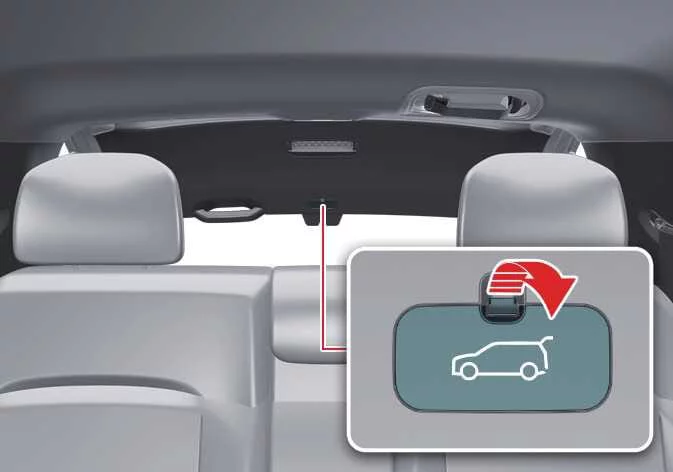
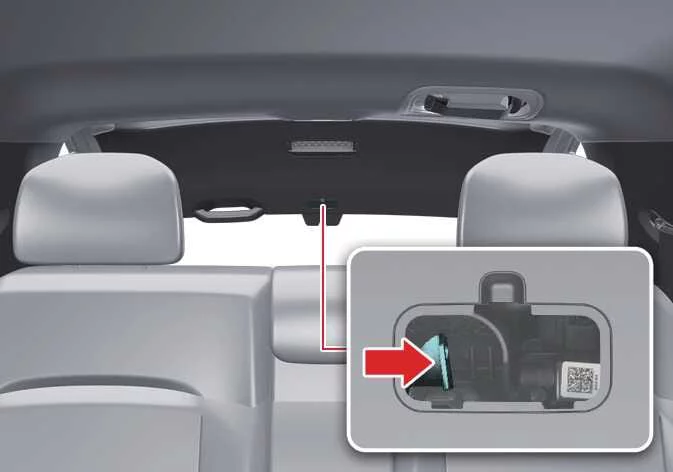
To manually unlock and open the liftgate from inside the luggage compartment, follow this procedure:
- Remove the cover located at the lower part of the liftgate trim.
- Slide the release latch in the direction shown by the arrow to unlock the liftgate.
-
Push the liftgate outward to open it.
WARNING
-
For emergency situations, make sure you know where the emergency liftgate safety release latch is located in your Kia Telluride and understand how to use it if someone is accidentally locked in the luggage compartment.
-
No person or animal should ever remain in the luggage compartment. This area is not designed for occupants and can be extremely dangerous during a collision or sudden stop.
-
Use the release latch only in emergencies. Exercise extreme caution, especially if the vehicle is moving or stopped in an unsafe location.
-
 Power liftgate automatic close
Using the power liftgate automatic close feature With the liftgate fully open, stand within the detection area approximately 20–40 inches (50–100 cm) behind the vehicle while carrying the smart key...
 Windows
The Kia Telluride is equipped with power windows that are operated using dedicated switches on the doors. Power window lock switch Rear door (left) power window switch Rear door ..
Other information:
Kia Telluride (LQ2, 2027-2026) Owner's Manual: Brake Assistant System (BAS)
The Brake Assistant System (BAS) is designed to help the Kia Telluride deliver stronger braking performance during emergency situations. When the system detects a rapid and forceful application of the brake pedal, it automatically increases braking pressure to assist the driver in achieving the shortest possible stopping distance.
Kia Telluride (LQ2, 2027-2026) Owner's Manual: Smart key
The Kia Telluride smart key combines the functions of a mechanical key with advanced remote features, allowing you to lock or unlock the doors and start the vehicle without inserting the key into the ignition. The smart key communicates wirelessly with the Kia Telluride whenever it is within approximately 33 ft.