
Kia Telluride: Rear View Monitor (RVM): (if equipped) / Rear View Monitor operation
Parking/View button
|
(1) Parking/View button
Press the Parking/View button (1) to switch the Rear View Monitor ON.
Press the Parking/View button (1) again to turn the Rear View Monitor OFF.
Rear view
|
|
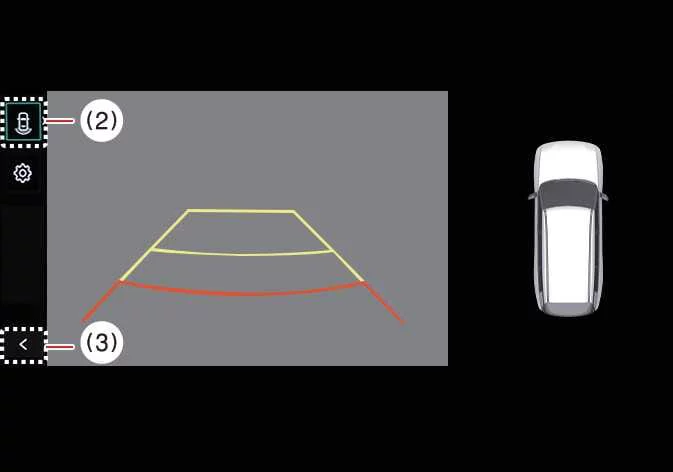
(2) View switching button
(3) Back button
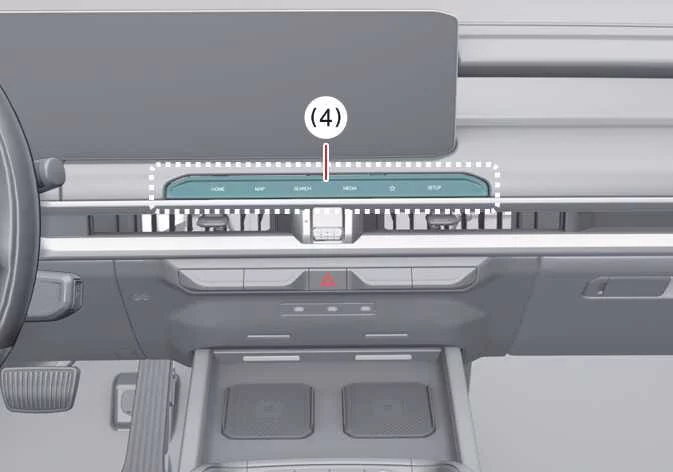
(4) Infotainment system operation button
Operating conditions
The Rear View function activates under the following conditions:
-
When the transmission is shifted into R (Reverse).
-
When the Parking/View button (1) is pressed while the transmission is in P (Park) or N (Neutral). In N (Neutral), vehicle speed must remain below 6 mph (10 km/h) for the Rear View Monitor to operate.
Press the View switching button (2) to alternate between Rear Top View, Rear View, and Rear Wide View while the camera display is active.
Non-operating conditions
The Rear View display turns OFF during parking under the following conditions:
-
When the transmission is shifted into P (Park).
-
When the Parking/View button (1) is pressed.
-
When the Back button (3) is selected on the Rear View Monitor screen.
-
When the infotainment system operation button (4) is pressed.
-
When the transmission is in N (Neutral) or D (Drive) and vehicle speed exceeds 6 mph (10 km/h).
TIP
When the transmission remains in R (Reverse), the Rear View Monitor stays active and does not turn OFF until the operating conditions change.
Extended Rear View Monitor
The Extended Rear View Monitor helps support safer low-speed parking by keeping the rear camera image visible after you shift from R (Reverse) into N (Neutral) or D (Drive). This allows the Kia Telluride driver to continue checking the area behind the vehicle while completing a parking maneuver.
Operating conditions
Extended Rear View Monitor operates when the gear is shifted from R (Reverse) into N (Neutral) or D (Drive) and the vehicle speed remains below 6 mph (10 km/h).
Non-operating conditions
Extended Rear View Monitor turns OFF under the following conditions:
-
When the gear is shifted to P (Park).
-
When the Parking/View button (1) is pressed.
-
When the back button (3) on the Rear View Monitor screen is pressed.
-
When the infotainment system operation button (4) is pressed.
-
When vehicle speed increases above 6 mph (10 km/h).
Rear Top View
|
|
|
(2) View switching button
(3) Back button
(4) Infotainment system operation button
Rear Top View displays an overhead-style image of the area behind the vehicle, helping the driver judge the space between the Kia Telluride and nearby vehicles, walls, curbs, or other objects while parking.
To turn Rear Top View ON, press the Rear Top View button.
TIP
-
When the gear remains in R (Reverse), the rear camera image stays displayed regardless of which rear view mode is selected.
-
Rear View and Rear Top View can show Rear Parking Guidelines. To display Rear Parking Guidelines, select Setup > Vehicle > Driver Assistance > Parking Safety > Camera Settings > Display Information > Rear Parking Guidelines in the infotainment system settings menu. Rear Parking Guidelines are not displayed on the Rear View while parking.
 Rear View Monitor settings
Warning Methods Driver Assistance Warning Methods To adjust the Warning Methods while the vehicle is ON, select Setup > Vehicle > Driver Assistance > Warning ..
 Rear View Monitor malfunction and limitations
Rear View Monitor malfunction If Rear View Monitor malfunctions, the image on the display may appear green, blue, black, distorted, or otherwise abnormal...
Other information:
Kia Telluride (LQ2, 2027-2026) Owner's Manual: Maintenance when towing a trailer
Your Kia Telluride requires more frequent maintenance when it is used regularly for trailer towing. Components that experience additional load include the engine oil, axle lubricant, engine cooling system, transmission, and brake system. Review the maintenance procedures for these items in the owner's manual before every towing trip and follow the recommended service schedule to help ensure reliable performance.
Kia Telluride (LQ2, 2027-2026) Owner's Manual: Windows
The Kia Telluride is equipped with power windows that are operated using dedicated switches on the doors. Power window lock switch Rear door (left) power window switch Rear door (right) power window switch Driver’s door power window switch Front passenger’s door power window switch TIP In cold or wet weather, freezing conditions may prevent the power windows from operating smoothly until the affected components thaw.