
Kia Telluride: Warning and indicator lights / LCD Display Modes
The sophisticated Kia Telluride LCD cluster features three distinct modes, allowing you to prioritize the data most relevant to your driving style. Easily toggle between these views by pressing the Mode button.
|
View |
Description |
|---|---|
|
Driving Assist view |
Provides real-time visual feedback from the advanced Driver Assistance Systems (ADAS) |
|
Navigation view |
Displays turn-by-turn navigation guidance directly in your line of sight |
|
Utility information view |
Centralizes essential driving data, vehicle health warnings, and trip statistics |
Driving Assist view
|
This mode provides an at-a-glance status of your active safety features, ensuring you are aware of your vehicle's environment:
-
Lane Keeping Assist (LKA) engagement status
-
Smart Cruise Control (SCC) settings and lead vehicle distance
-
Lane Following Assist (LFA) operational state
For a comprehensive understanding of these safety technologies, please consult the dedicated Driver assistance section of your owner's manual.
Navigation view
|
|
This mode is optimized to display the active navigation route, keeping you on track without requiring you to divert your attention to the center console.
Utility information view
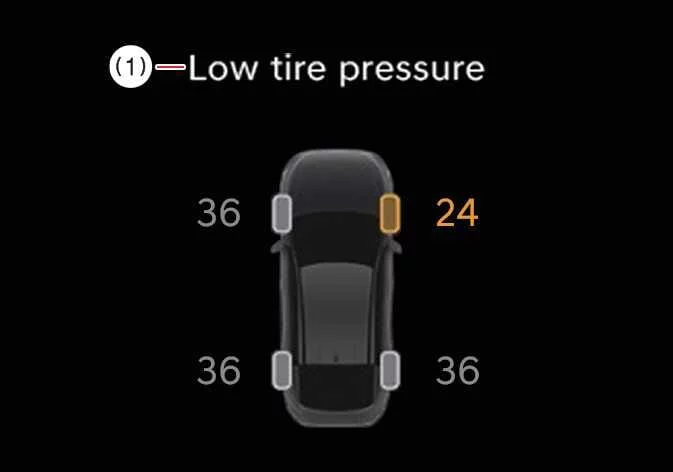
Low pressure warning display
|
|
Should the Tire Pressure Monitoring System (TPMS) detect that one or more of your tires has dropped below the recommended pressure, a specific alert will appear here, clearly highlighting which tire requires attention. Please refer to the Tire Pressure Monitoring System (TPMS) section for proper inflation procedures.
Fuel economy
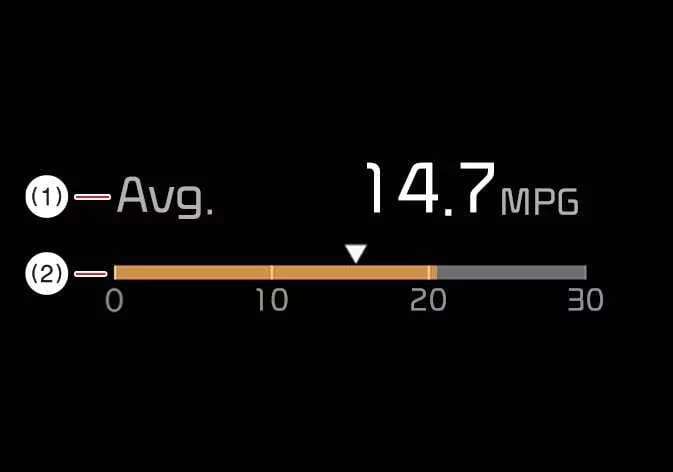
To assist you in optimizing your efficiency while driving your Kia Telluride, fuel economy metrics are conveniently displayed at the bottom center of the Full LCD cluster.
|
|
Average fuel economy:
-
This value is calculated based on the cumulative distance and fuel usage data from your most recent driving trip.
-
Measurement range: 0–99.9 mpg or equivalent units (km/L, L/100 km).
Efficiency Tip: For precise data accuracy, please note that average fuel economy statistics will not update until you have driven the vehicle for more than 10 seconds or traveled at least 0.03 miles (50 m) after the engine is started.
-
Instant fuel economy:
-
This real-time indicator reflects your fuel consumption over the previous few seconds, provided your vehicle speed exceeds 6.2 mph (10 km/h).
-
Measurement range: 0.0–50.0 mpg or equivalent units (0.0–30 km/L, L/100 km).
-
Drive Info Display
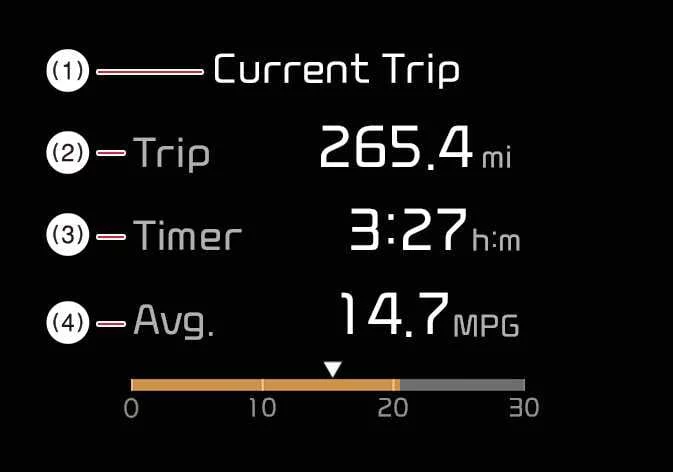
The Drive Info screen provides a concise summary of your current trip, including total distance traveled, overall fuel efficiency, and the duration of the journey since the last ignition cycle.
|
|
-
Calculations for fuel efficiency commence once you have driven more than 0.19 miles (300 m).
-
This information resets automatically if the driver’s door is opened or if the vehicle remains off for approximately 3 minutes following ignition shutoff.
-
You can manually reset these metrics at any time by holding the “OK” button for approximately 1 second while the data is active on the screen.
-
Data accumulation continues while the engine is idling, ensuring accuracy even when stationary.
Information Since Refueling
|
|
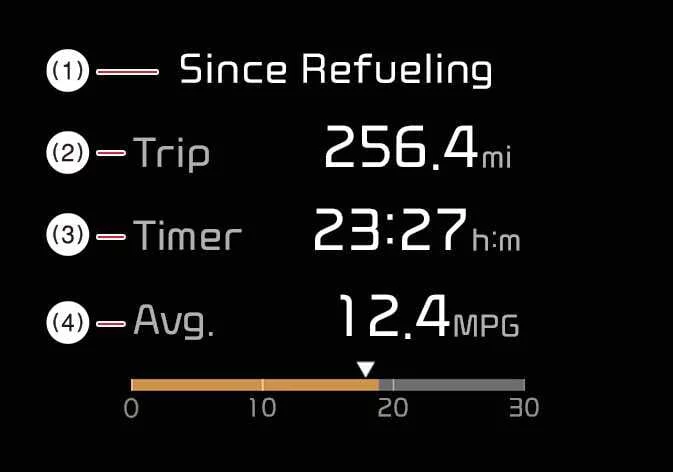
This specific display tracks your driving performance—including distance, fuel efficiency, and time—specifically since your last refueling event.
-
Calculations become active after traveling more than 0.19 miles (300 m) following a refill.
-
A manual reset is possible by holding the “OK” button for 1 second; otherwise, the system detects refueling automatically and resets the data accordingly.
-
Metrics continue to aggregate as long as the engine is running, providing a complete picture of your efficiency per tank.
Maintenance Tip: Ensure you drive for at least 0.19 miles (300 m) after each engine restart to allow the system to accurately recalculate accumulated average driving metrics.
Accumulated Driving Information Mode
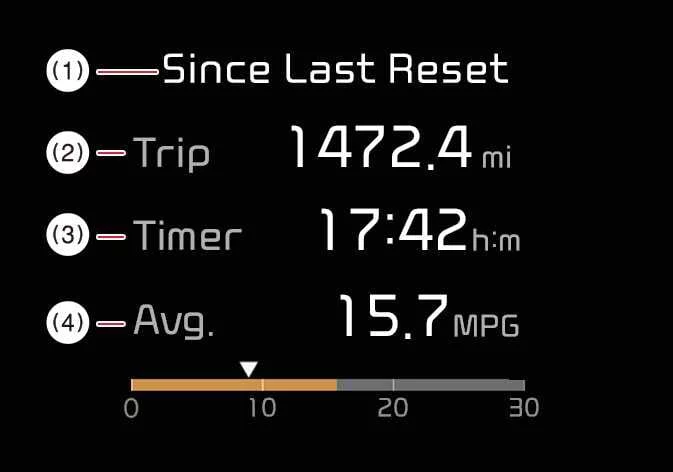
This mode offers a long-term view of your Kia Telluride performance, showing total aggregated trip distance, lifetime average fuel efficiency, and total engine running time.
|
|
-
The system begins calculating these cumulative stats after the vehicle exceeds 0.19 miles (300 m).
-
You can reset the entire cumulative data set at any time by pressing and holding the “OK” button for 1 second.
Other View Modes
Master Warning Mode

|
This vital mode provides immediate notification of critical vehicle situations, including:
-
ADAS malfunctions, operational limitations, or sensor (radar/camera) obstructions.
-
LED headlamp or exterior lighting system faults.
-
TPMS alerts, including sensor failure or dangerously low pressure warnings.
When an issue is detected, the Master Warning icon ( ) will illuminate on your dashboard. Once the underlying concern is successfully addressed, the warning indicator will automatically clear from the display.
Service Mode
The Service Mode is designed to help you stay proactive with your Kia Telluride maintenance schedule.
|
|
|
Service Interval: Your vehicle automatically monitors your driving habits to calculate when your next scheduled maintenance is due based on both mileage and elapsed time. When you are within 900 miles (1,500 km) or 30 days of a required service, a reminder will appear briefly whenever you start the vehicle.
Service Required: If a scheduled service interval is exceeded, the “Service Required” message will appear each time the vehicle is powered on as a gentle prompt to schedule your appointment.
Maintenance Accuracy: Please note that the accuracy of the service tracking may be impacted if the battery is disconnected or if it experiences a full discharge, as the system may require recalibration.
 LCD Display
The high-resolution LCD display in your Kia Telluride serves as your primary hub for vehicle information, safety alerts, and system settings. You can seamlessly navigate through various display modes and configure settings using the intuitive control buttons conveniently located on your steering whe..
 LCD display messages
Door, hood, liftgate, or sunroof open The LCD display in your Kia Telluride provides a visual warning whenever a door, the hood, the liftgate, or the sunroof is not fully closed...
Other information:
Kia Telluride (LQ2, 2027-2026) Owner's Manual: Main components of the Occupant Detection System (ODS)
A passenger detection sensor is built into the front passenger seat cushion. An electronic control unit evaluates occupant information and determines whether the front passenger air bag should be activated or deactivated. The overhead console displays the PASSENGER AIR BAG OFF () indicator whenever the front passenger air bag has been switched off by the system.
Kia Telluride (LQ2, 2027-2026) Owner's Manual: Ergo-motion seat (Driver's seat): (if equipped)
Setting the Ergo-motion seat The Ergo-motion seat in the Kia Telluride uses adjustable air pockets to provide customized cushioning and support for the driver. By changing the support around the hips, waist, and lumbar area, this feature helps reduce fatigue and improve comfort during long drives, continuous highway travel, or changing driving conditions.