
Kia Telluride: Front seat adjustment for power seat : (if equipped) / Cushion support
The cushion support adjustment feature allows the driver to fine-tune the seating position for improved comfort and additional thigh support. Proper adjustment can help reduce fatigue during extended trips and contribute to a more comfortable driving experience in the Kia Telluride.
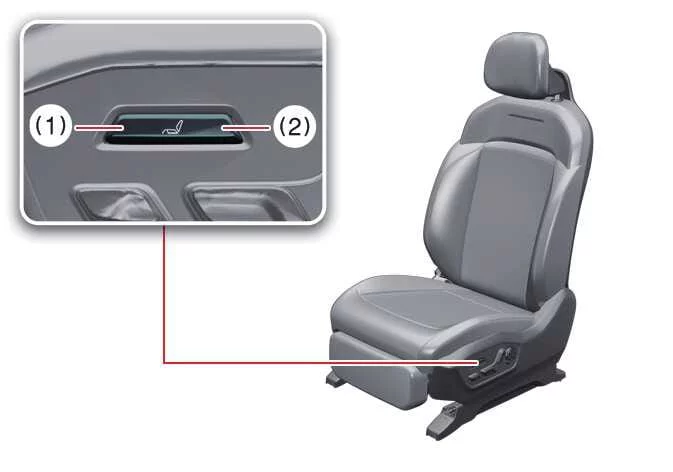
|
|
Operation
-
Push the cushion support adjustment switch upward (1) to raise the cushion support.
-
Push the cushion support adjustment switch downward (2) to lower the cushion support.
-
To raise the cushion support to its highest position, continue holding the switch for approximately 8 seconds. Once the maximum height has been reached, the mechanism will stop moving even if the switch remains pressed. Simply release the switch after the adjustment is complete.
 Leg support
Upward Downward Operation Push the rear portion of switch (1) forward to raise the leg support...
 Seat bolster (Driver's seat) : (if equipped)
The adjustable driver's seat bolster is designed to provide additional side support, helping keep the driver securely positioned during cornering and improving overall comfort...
Other information:
Kia Telluride (LQ2, 2027-2026) Owner's Manual: Interior care
Use the detailed guidelines, professional cleaning techniques, and preventative maintenance recommendations outlined in the following sections to properly care for and preserve the immaculate cabin condition of your Kia Telluride. Interior general precautions Prevent harsh chemical agents such as personal perfumes, cosmetic oils, facial sunscreens, hand cleaners, and liquid air fresheners from coming into direct contact with the sensitive interior trim parts of your Kia Telluride, because these substances can easily cause permanent chemical damage, staining, or surface discoloration.
Kia Telluride (LQ2, 2027-2026) Owner's Manual: Forward Attention Warning settings: (if equipped). Forward attention warning
Forward attention warning Driver assistance DAW (Driver attention warning) Forward attention warning With the vehicle on, select Setup > Vehicle > Driver assistance > DAW (Driver Attention Warning) > Forward attention warning in the infotainment system to choose whether to use this function.